The draw.io Workflow Engine reads your business process diagrams and executes them as fully stateful, persistent workflows — runnable from the command line or as a containerised REST API.
Why draw.io Workflow Engine
Designed for teams who want workflow automation without the complexity of enterprise BPM suites. Build visually, deploy instantly.
Use draw.io's standard flowchart shapes. The engine reads your diagram and executes it directly. Node behaviour is configured through draw.io's custom properties panel — no separate config files needed.
Runs as a Python CLI tool on your laptop, as a containerised HTTP server on Kubernetes, or on serverless platforms like IBM Code Engine. One file. Zero infrastructure dependencies by default.
Every step is saved after every node. Workflows survive server restarts, manual interventions, and API timeouts. State is stored locally or in IBM Cloudant for multi-replica deployments.
Parallel branch execution, nested sub-workflows, REST call integration, manual input gates, scheduled delays, Basic Auth, IBM COS model storage, and a full metrics endpoint — all built in.
Getting started
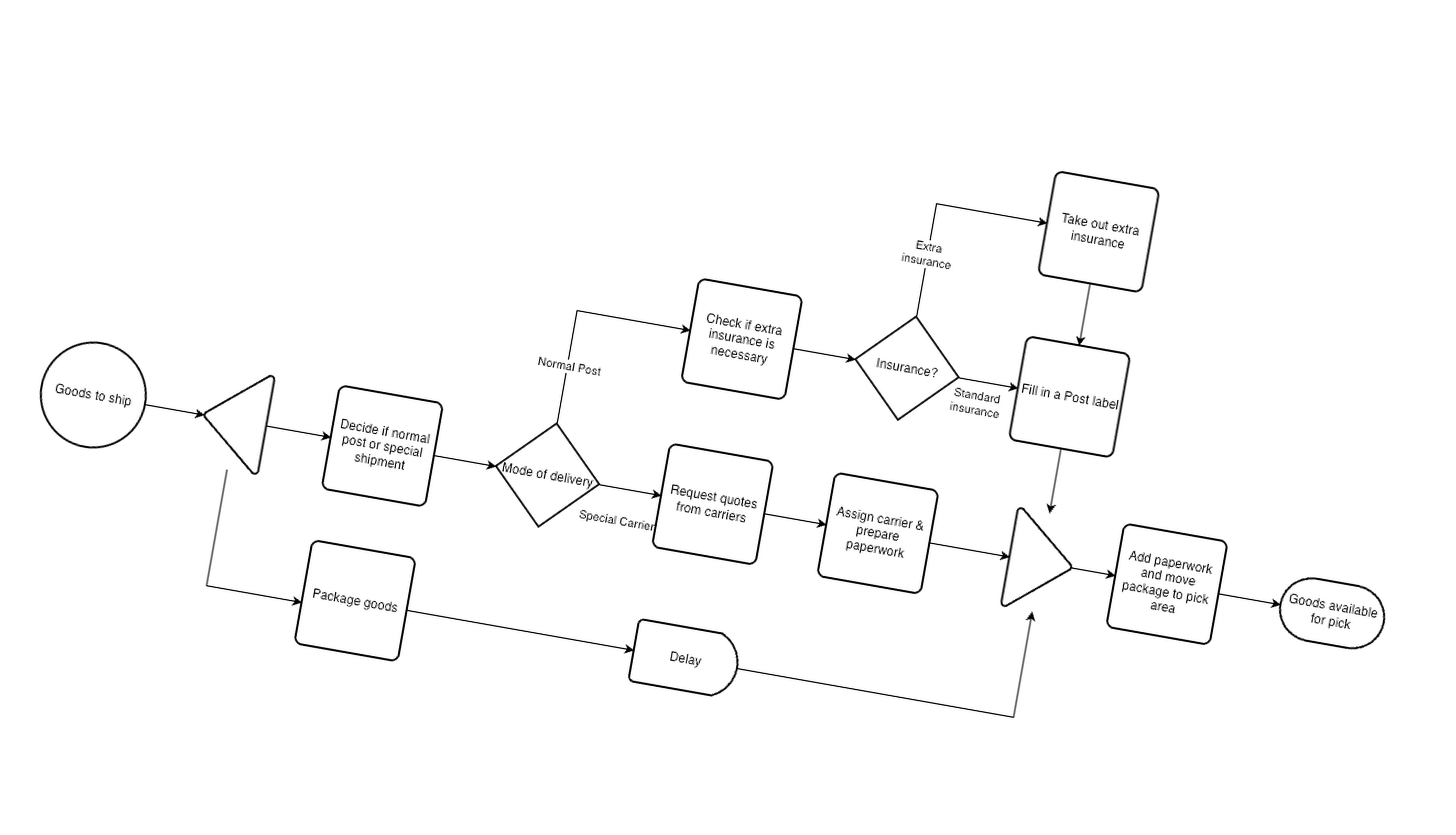
Open draw.io and create a flowchart using the supported subset of flowchart shapes: Start, End, Process, Decision, Extract, Merge, Manual Input, Delay, and Predefined Process.
Right-click any shape → Edit Data. Add key-value properties to control behaviour: set context values, configure REST calls (type: rest), or define routing conditions on connectors.
Save your diagram as a .drawio file. Place it in the same directory as main.py, or configure IBM COS as the model backend.
Execute from the command line: python main.py mymodel. Or start an HTTP server: python main.py --server.
The engine persists state after every node and prints a full execution summary. Paused workflows can be resumed with another run using the same instance ID.
Supported elements
The engine supports a carefully chosen subset of draw.io's flowchart shapes. Each node type maps to a specific execution behaviour.
Entry point of the workflow. Can carry default context values as custom properties. If context is passed by a parent workflow, start node values act as defaults only — they never overwrite inherited context.
Terminal node. When reached, the workflow is marked completed. Its final context contains all key-value pairs accumulated across every executed node.
The workhorse node. Merges fixed key-value pairs into the workflow context, or calls an external REST API (type: rest) and optionally waits for the response in blocking or scheduled mode.
Invokes another .drawio model as an independent sub-workflow. The parent passes its current context to the child and waits for completion before continuing.
Routes execution based on a context variable. Each outgoing connector carries a label matching an expected context value. If no connector matches, execution stops with an error. Supports wildcard routing.
Splits a single flow into parallel branches. By default, branches run as concurrent threads within the same request. When ENGINE_URL is set, each branch is dispatched as an independent HTTP child request.
Rejoins parallel branches. Execution waits until all sibling branches have completed. Context from all branches is merged before the flow continues to subsequent nodes.
Pauses the workflow and waits for an external action. The engine writes a manual_input_*.json file. When its status is set to completed and values added to input_data, the next run resumes from this point.
Pauses execution for a configured duration (delay: 30s / 5m / 2h / 1d). In blocking mode the request is held open; in scheduled mode the engine returns immediately and awaits an external resume call.
Deployment
The CLI mode is the fastest path to running a workflow. It reads the .drawio model from the current directory, executes it, prints a full summary, and exits.
State is persisted to process_state_<id>.json files locally. On a pause, run again with --id to resume.
In server mode the engine exposes a small REST API. Any system that can make HTTP requests can start, resume, and monitor workflows.
HTTP 200 → completed this call. HTTP 201 → paused (manual input, delay, or parallel wait).
The included Containerfile produces a minimal Python 3.11 container image. Deploy on any container platform: Kubernetes, OpenShift, IBM Code Engine, or local Podman.
All settings in CREDENTIALS.txt can be overridden by environment variables — the recommended approach for containers.
API Reference
All endpoints except GET /health require Basic Auth credentials when enabled in CREDENTIALS.txt. Add -u username:password to any curl command when auth is on.
| Method | Path | Auth | Description |
|---|---|---|---|
| POST | /workflows/start | Required | Start or resume a workflow. Body: {"model":"name","instance_id":"opt","context":{}}. Returns 200 (completed) or 201 (paused/waiting). |
| POST | /workflows/<id>/continue | Required | Explicitly advance a paused instance. Intended for form submissions and manual approvals. |
| POST | /workflows/<id>/callback | Required | Deliver an asynchronous event to a waiting instance. Used internally for parallel branch coordination. |
| GET | /workflows/<id>?model=<name> | Required | Retrieve full persisted state: context, history, wait states, and status. The model query parameter is required. |
| GET | /health | Open | Liveness probe. Returns {"status":"ok","uptime_seconds":N}. Always accessible — suitable for load balancer and Kubernetes readiness probes. |
| GET | /metrics | Required | Runtime counters: total requests, completed, waiting, errored, currently in-flight instances. |
The CLI mode runs a single workflow synchronously and prints a full execution summary. No server, no database, no configuration needed beyond a .drawio model file in the same directory.
State is written to process_state_<id>.json on disk. On a pause, re-run with --id to resume from the exact point it stopped.
--context JSON initial context object--id Resume a paused instance by ID--server Switch to HTTP server mode--port Server port (default: 8080)--simulate-manual-input Auto-advance manual gates--max-call-depth Subprocess nesting cap (default: 5)--process-delay-seconds Inter-node delayConfiguration
CREDENTIALS.txt holds all runtime configuration. Every setting can be overridden by an environment variable with the same key name — recommended for containers and serverless.
Control where workflow model files and execution state are stored.
local (default) or cos — where .drawio files are loaded fromcloudant for multi-replica deployments.https://s3.us-south.cloud-object-storage.appdomain.cloudControl access and parallel branch dispatch behaviour.
8080. Env var takes priority over --port.Known limitations
By default, branches run as threads within a single HTTP request. On serverless platforms with short request timeouts, set ENGINE_URL to dispatch branches as independent HTTP requests instead.
Workflows paused at scheduled delay or manual input nodes require an external trigger to resume. Use blocking mode for time-based delays where possible; otherwise design a cron or polling mechanism.
Local file state is not compatible with multi-node deployments. Use IBM Cloudant as the state backend for clustered or multi-replica setups.
The engine supports HTTP Basic Authentication. More advanced schemes (OAuth, JWT, API keys) are not built in. Terminate TLS at an ingress controller or reverse proxy.
Sub-model nesting depth capped at 5 levels. History entries capped at 500 per instance. Request body capped at 1 MB. All limits are adjustable via CLI flags.
Scheduled REST Process nodes fire one-at-a-time across parallel branches. Additionally, concurrent resume requests arriving before the first response is written may call the external endpoint twice. Design REST endpoints to be idempotent as a general best practice.
Free & Open Source
The complete engine is a single Python file. Download the package, install the dependencies, place a .drawio model file next to main.py, and run.
Includes: main.py · CREDENTIALS.txt template · Containerfile · PODMAN.md · wsgi.py · requirements.txt · User Guide (PDF) · three sample .drawio workflow models (payment, shipment, review)
Extract the archive and run pip install -r requirements.txt. Refer to CREDENTIALS.txt and PODMAN.md for configuration.
Requirements
flask — HTTP server frameworkflask-cors — CORS headersrequests — outbound REST calls from Process nodesgunicorn — production WSGI server.drawio model file to executeibm-cos-sdk — load models from IBM COSboto3 — S3-compatible / MinIO model storageibmcloudant — Cloudant state backend for multi-replicaibm-cloud-sdk-core — IBM IAM authentication